Governing Zones at Scale with Environment Groups... and the Copy Button That Doesn't Exist (Yet)
Environment Groups are one of the best things to happen to Power Platform governance. They let you stop configuring guardrails environment by environment and start applying them by purpose instead. Group your environments, attach your governance rules, and you're done.
Except for one thing.
Once you start running a zone model at scale, you quickly end up with dozens of Environment Groups. And today, there is still no Copy button.
So I built one.
This post explains the problem it solves, how it works, and one implementation detail that caught me completely off guard.
🎯 The Zone Model
Good governance is proportional. Someone automating their own inbox doesn't need an architecture board. A multi-agent system processing customer data absolutely does. Treating both the same either slows innovation to a crawl or leaves critical workloads under-protected.
That's the thinking behind adaptive security and zones: classify what people build based on risk and business impact, then let that classification determine which governance controls apply.
Green: Personal productivity. One maker, personal data, no approval required. Deliberately low friction.
Yellow: Team or department solutions. Supports a real business process, so CoE approval, Managed Environments, and proper ALM.
Red: Customer data, external users, or autonomous agents. Architecture board approval, professional development practices, and full lifecycle management.
Zones are assigned at the environment level, so everything inside inherits the same classification. You classify the environment once instead of evaluating every app, flow, and agent individually.
🧱 Environment Groups Make Zones Real
A zone model on a PowerPoint slide doesn't improve governance. Environment Groups are what turn that model into enforceable controls.
Group environments by zone, attach governance rules, and every environment in that group inherits the same guardrails. Add a new environment to the Yellow group and it immediately receives the correct sharing restrictions, connector policies, Solution Checker requirements, backup retention, and Copilot settings.
The rule catalog keeps growing, which is great news. Every new rule is one more governance decision you no longer have to enforce manually.
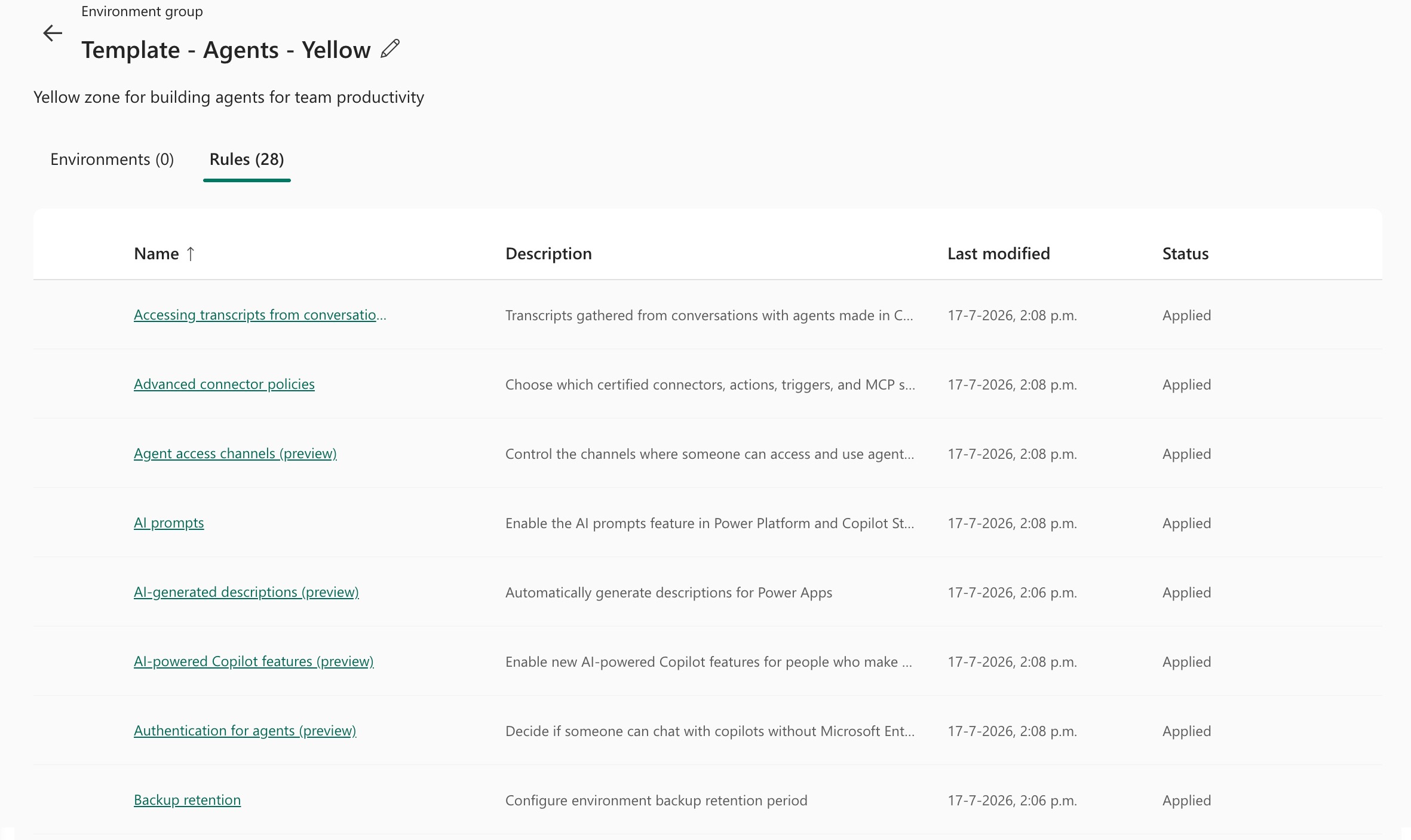
One Environment Group. Twenty-eight rules. Everything from agent access channels and advanced connector policies to backup retention and Copilot configuration.
😩 Where It Falls Apart
The problem is that zones multiply.
You don't end up with just Green, Yellow, and Red.
You end up with a Yellow variant for an agent pilot where one rule is relaxed. A Red variant for a regulated business unit. Template groups for new customers. A copy of production to validate policy changes safely before rollout.
Every one of those groups has to be configured manually.
Open the source group. Write down every rule and its value. Create a new group. Click through every setting again.
Twenty-eight rules means twenty-eight opportunities to miss a setting, mistype a value, or overlook the option hidden three scrolls down.
The real cost isn't the afternoon you lose clicking through settings.
It's configuration drift.
If your Yellow zone for Europe and your Yellow zone for North America were both created by hand, they won't stay identical forever. Eventually, "Yellow" no longer guarantees the same governance controls, and your zone model quietly stops being trustworthy.
🚀 The Environment Group Copier
That's the gap this browser extension fills.
It's an open source extension for Chrome and Microsoft Edge that copies an Environment Group, rules and all.
Under the hood it talks directly to the Power Platform REST APIs using your own identity. No PowerShell session. No external service. Nothing is routed through anyone else's infrastructure.
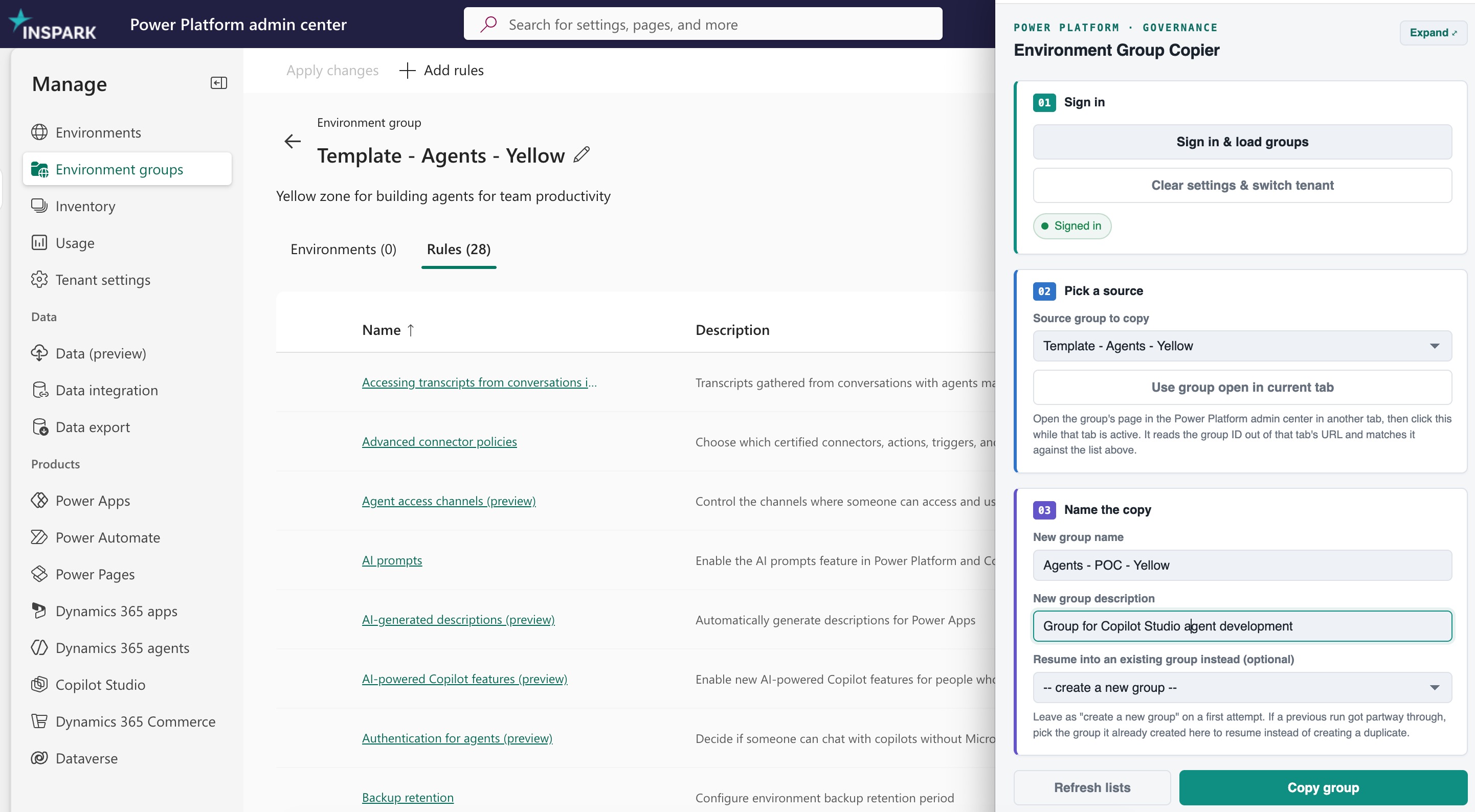
Using it is straightforward:
Sign in using your own Entra ID app registration. Your credentials stay in your tenant.
Select the source Environment Group. The list is populated directly from your tenant, and if the group is already open in another Admin Center tab, you can read it automatically.
Enter a name for the new group and click Copy.
The extension retrieves the complete configuration and recreates it in a brand new Environment Group.
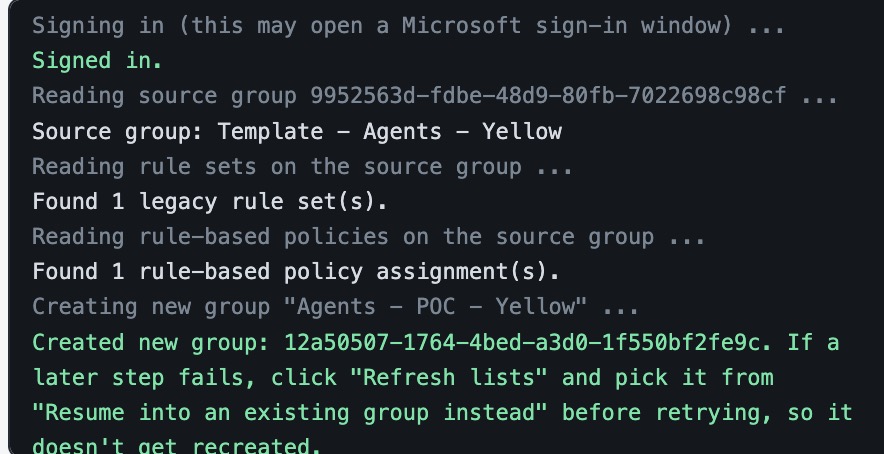
Every API call and every result is written to the log, so you can see exactly what happened.
🔍 The Detail That Will Catch You Out
Those twenty-eight rules you see in the Admin Center aren't actually twenty-eight objects behind the scenes.
Power Platform currently uses two different rule systems, even though the UI presents them as a single list:
Legacy rule sets for sharing, lifecycle management, Copilot, and generative AI settings.
Rule-based policies, where most of the newer governance capabilities are implemented.
You'll see both appear in the extension log: one legacy rule set and one rule-based policy assignment that together make up the full configuration.
My first implementation only handled the legacy rule sets.
It happily reported success while copying only five of the twenty-eight rules. The remaining twenty-three were silently missing, which is exactly the kind of failure you don't want from a governance tool.
The extension now supports both systems.
Rule-based policies are recreated rather than reassigned because a policy can only belong to a single Environment Group at a time.
If you're building something similar yourself, budget time for this.
⚠️ Honest Caveats
Some of the endpoints this extension relies on aren't documented in the public Power Platform API reference.
I discovered them by watching the same API calls the Power Platform Admin Center makes when you create or modify Environment Groups.
That approach works well, but Microsoft hasn't committed to keeping those endpoints stable. A future Admin Center update could change them without notice. Even the documented APIs are currently marked as preview, which shows how new this area still is.
So treat the extension accordingly:
Test against a non-production Environment Group first.
Compare the copied configuration with the original before relying on it.
Think of it as a tool that saves hours of repetitive administration, not as unattended automation.
That's exactly what it's designed for.
🧩 Final Thoughts
Environment Groups are the right enforcement layer for a zone model.
What's still missing is the ability to treat governance configuration like any other artifact. Something you can copy, template, and reuse without rebuilding it by hand every time.
Until Microsoft adds that Copy button, this extension fills the gap.
It lets you:
Create new zone variants from a trusted baseline.
Eliminate manual recreation of dozens of governance rules.
Prevent configuration drift between supposedly identical zones.
Copy both legacy rule sets and modern rule-based policies.
Review every API call through a detailed execution log.
Run everything entirely within your own tenant.
If you're managing more than a handful of Environment Groups, it'll save you the same afternoon it saved me.
More importantly, it'll help ensure that a Yellow zone actually means the same thing everywhere in your tenant.
📦 Get the Extension
Environment Group Copier on GitHub (MIT with Commons Clause): use it, fork it, run it in your own organization.
https://github.com/Thijsman/PowerPlatformGroupCopier
